

Article
Exporting Respondent Transcripts
1. Overview
The respondent transcript export provides the full conversational record of each survey session as a collection of individual Markdown files. Each file contains the complete back-and-forth between the interviewer (the survey) and the respondent, preserving the exact question wording, answer options, and responses in the order they were presented.
This format is purpose-built for analysis with large language models (LLMs). Because each transcript is a self-contained Markdown document, it can be fed directly into tools like Claude Cowork, ChatGPT, or any other LLM-based workflow for quality control, thematic analysis, or survey design review.
2. How to Export
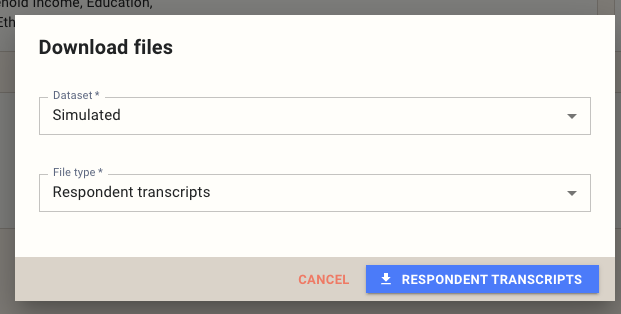
Open the survey you want to export from, then click the Download button on the survey page. In the dialog that appears, select a dataset and choose Respondent transcripts as the file type, then click Respondent Transcripts to start the download.
3. File Structure
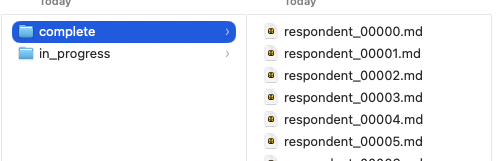
The export downloads as a .zip archive. Inside, transcripts are organized into two folders:
- complete/ — Transcripts from respondents who finished the survey.
- in_progress/ — Transcripts from respondents who started but have not yet completed the survey.
Each respondent has a single Markdown file named with a zero-padded index (e.g., respondent_00000.md, respondent_00001.md).
4. Transcript Format
Each transcript is structured as a conversation using Markdown headings and horizontal rules. Questions appear under an ## Interviewer heading, and responses appear under a ## Respondent heading. Each exchange is separated by a horizontal rule (---).
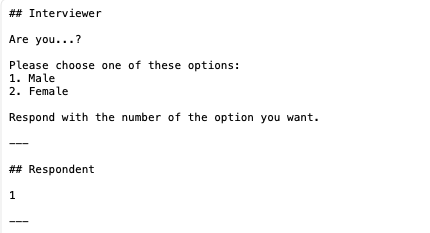
Interviewer blocks include the full question text and, for closed-ended questions, the complete list of answer options. Respondent blocks contain the answer exactly as recorded — a selected option number, typed text, or numeric value.
5. Important Notes
Raw, non-anonymized data. Transcripts contain the unprocessed responses exactly as they were captured. Open-ended answers, demographic details, and any personally identifiable information entered by the respondent will be present in the files. Handle these exports with the same care as any other raw respondent data.
Simulated data contains placeholder values. If you export from a simulated dataset, open-ended responses will contain random or meaningless text, and numeric questions (such as age) will show arbitrary numbers. This is expected — simulated data is generated to exercise survey logic, not to produce realistic content.
6. Best Use Cases
Check survey flow with simulated data. Run a simulated dataset and export the transcripts to review the question sequence, branching logic, and overall flow before going live. Simulated responses will be random, but the question wording, order, and routing will reflect the real survey experience.
Check survey flow with synthetic data. If you are using synthetic twins, export and review the transcripts to verify that the survey reads naturally with more realistic response patterns. This is especially useful for catching awkward piping, confusing skip logic, or questions that feel out of place in context.
QA on live responses. Once real data is coming in, export completed transcripts and review them for issues such as broken logic paths, unclear question wording, missing answer options, or unexpected routing. This is the most direct way to see the survey exactly as your respondents experienced it.
7. Analyzing Transcripts with an LLM
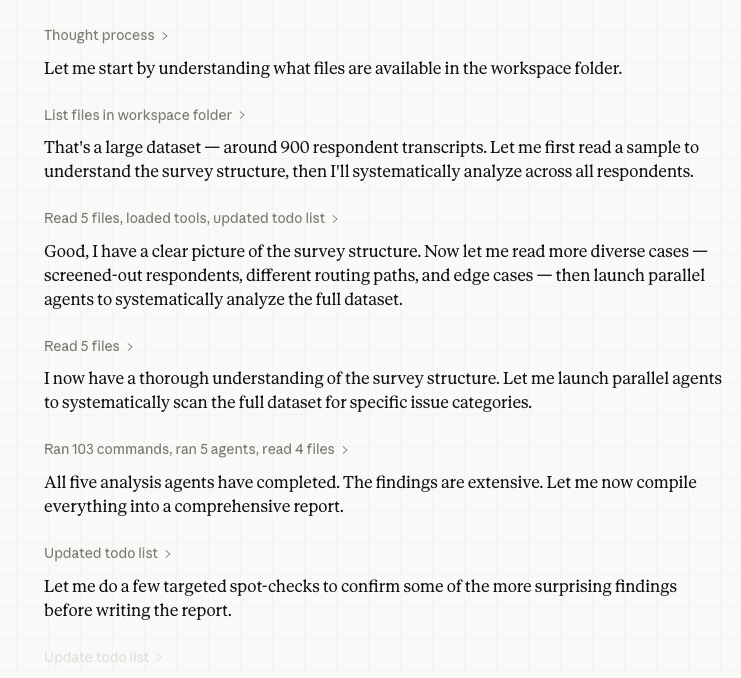
The Markdown transcript format is optimized for LLM analysis. Each file is self-contained, clearly structured, and small enough to fit easily within a model's context window. This makes it straightforward to batch-process hundreds of transcripts for quality review.
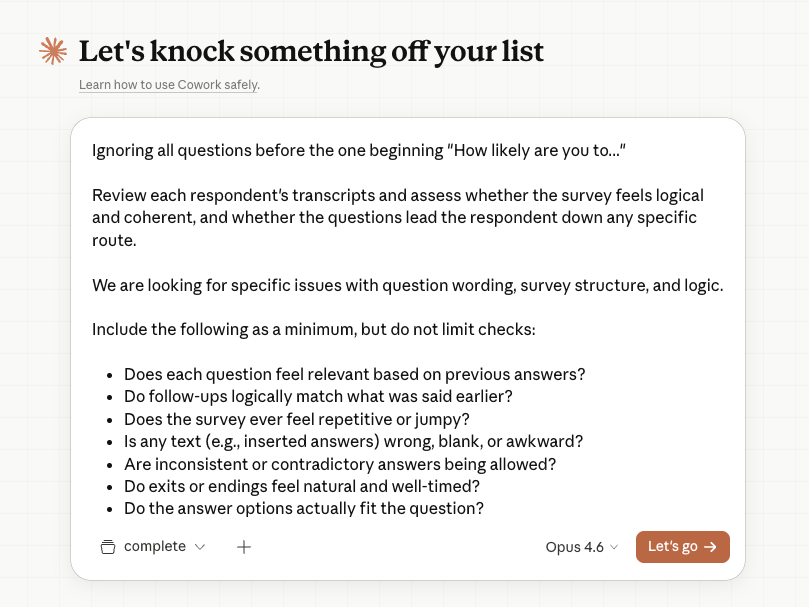
A typical workflow in a tool like Claude Cowork might look like this:
Sample Prompt
Below is a sample prompt you can adapt for your own QA review. Paste it into your LLM tool of choice along with the transcript files.
Review each respondent's transcript and assess whether the survey feels
logical and coherent, and whether the questions lead the respondent down
any specific route.

We are looking for specific issues with question wording, survey
structure, and logic. Include the following as a minimum, but do not
limit your checks to these items:

- Does each question feel relevant based on previous answers?
- Do follow-up questions logically match what was said earlier?
- Does the survey ever feel repetitive or disjointed?
- Is any inserted or piped text incorrect, blank, or awkward?
- Are inconsistent or contradictory answers being allowed through?
- Do exits or endings feel natural and well-timed?
- Do the answer options fit the question being asked?
- Do repeated sections reflect earlier choices?
- Does the overall journey feel coherent?

If the dataset is simulated, focus only on question wording, structure,
and logic — the responses themselves will be random and should not be
evaluated for validity.
Adjust the checklist to match the specific concerns for your study. For example, you might add checks for brand name consistency, proper randomization of answer lists, or correct quota routing.