
When and Why to Use
Use this to gather nuanced preferences across paired options using a rating scale. Ideal for:
- Capturing degrees of preference between two alternatives
- Visualizing directional lean with intensity
- Behavioral or brand comparison tasks
Supports slider or button input styles with configurable point scales.
Other Names and Formats
This or That Rating captures a comparative preference rating using a bipolar rating scale. Its traditional layout is also called a bipolar matrix. With opposite attribute labels, such as Traditional–Modern or Difficult–Easy, it becomes a semantic differential question or semantic differential scale. Brand-versus-brand endpoints instead measure the direction and strength of preference between those alternatives.
Chat Experience
- Each row shows a pair of options with a slider or buttons between them
- The midpoint represents neutrality; endpoints indicate strong preference
- Don't know option appears if configured
| Button style | Slider style |
|---|---|
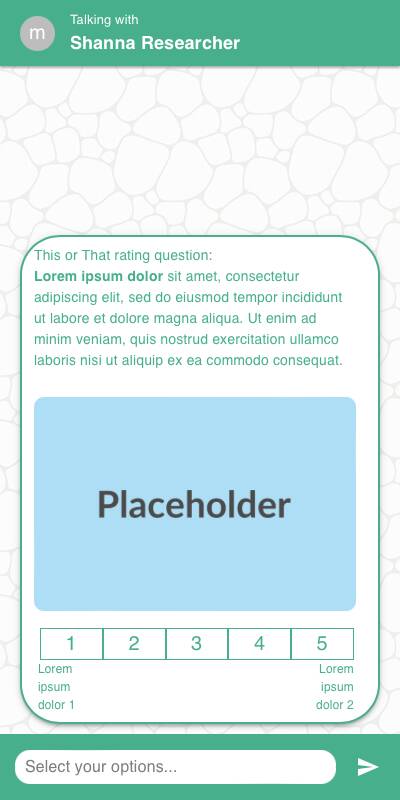 | 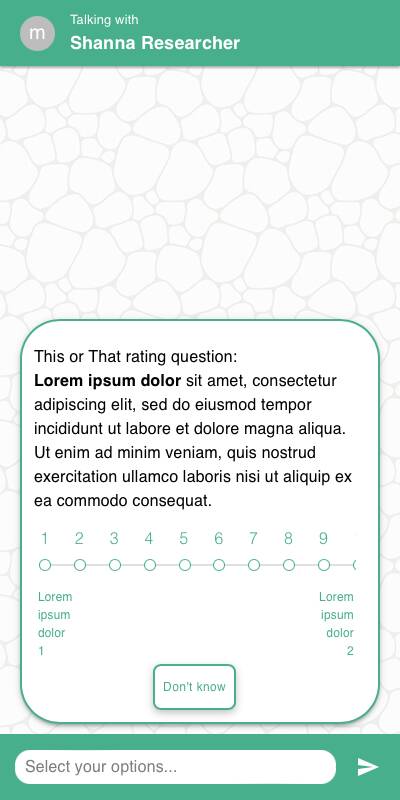 |
Traditional Experience
- Pairs are displayed in tabular layout with rating scale between them
- Works well with remote or keyboard navigation
- Layout adapts to available screen width
| Button style | Slider style on mobile |
|---|---|
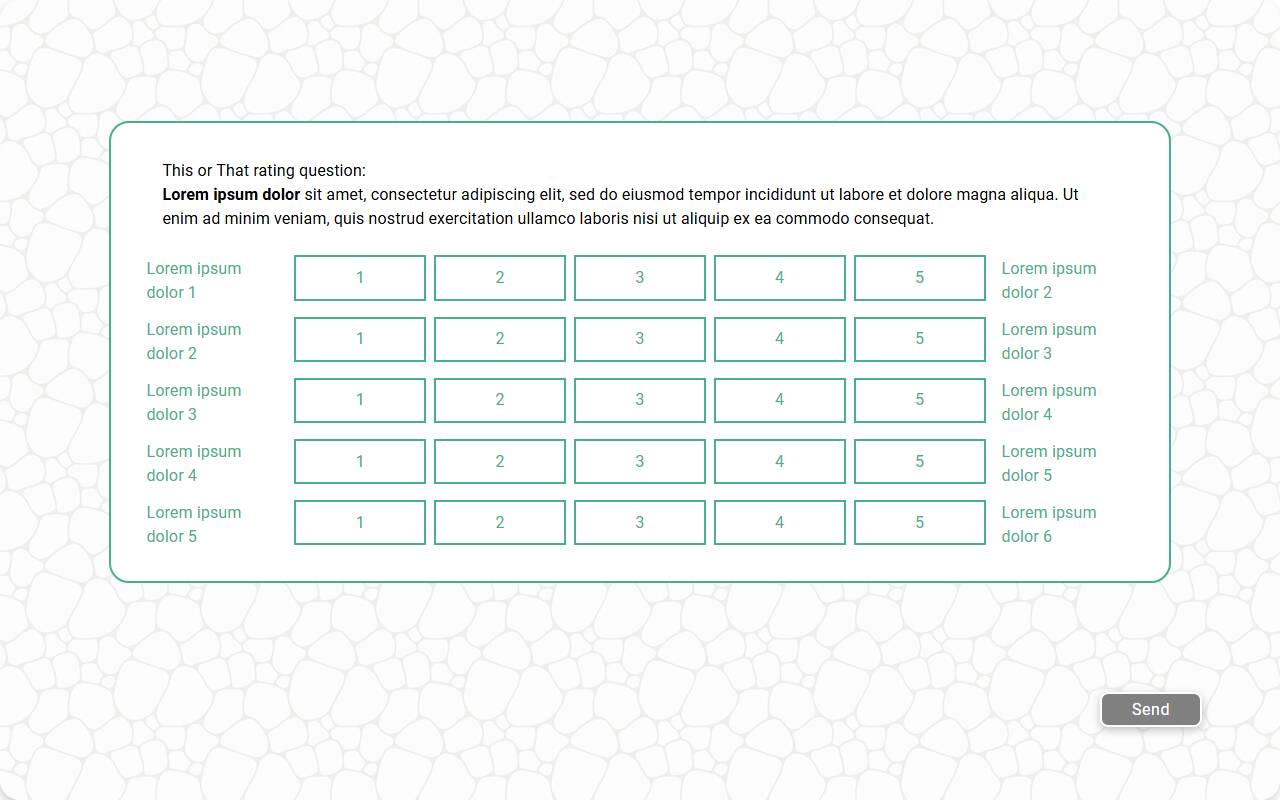 | 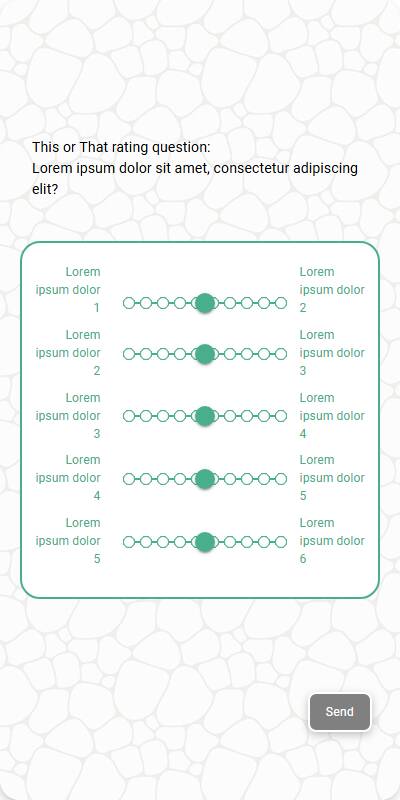 |
Configuration Options
| Option | Type | Required | Default | Description |
|---|---|---|---|---|
question | string | yes | - | The prompt shown to the user |
row_options | List[List[str]] | yes | - | List of 2-option comparisons per row |
row_name | string | no | "scale" | Label for the row dimension in reporting |
number_of_points | int | no | 5 | Number of scale points; slider and button styles support 2-10 points |
first_point | int | no | 1 | Starting value for scale (optional) |
style | string | no | "slider" | "slider" or "button" input style |
dont_know_option | str | no | "" | Optional "Don't know" response per pair; reported with this text and stored as a sentinel value |
randomize | bool | no | False | Randomize row order |
default | Dict[str, int] | List[Dict[str, int]] | no | random | Test-data defaults keyed by stable row ID (row1, row2, and so on), or a list of candidate dictionaries — each simulated respondent picks one at random |
recodes | Dict[str, str] | no | - | Map exact point strings (e.g., "1", "5") to reported labels; no range or percentage syntax |
image | MediaItem | no | - | Optional image above the task |
image_size | Tuple[int, int] | no | (600, 600) | Bounding box size for a displayed image |
custom_validator | Callable[[dict[str, int | str]], str | None] | no | - | Called with the complete parsed grid in both chat and traditional experiences; Don't know rows arrive as strings. Return an error message to reject the response, or None to accept. |
number_seconds | int | no | 0 | Seconds to wait before allowing the respondent to continue |
tags | s.tag() | no | - | Used in token substitution and reporting |
id | str | no | - | Optional stable identifier for this question |
Example Code
Basic usage:
s.this_or_that_rating_question( "Which of the following do you prefer?", number_of_points=5, row_options=[ ["Apples", "Oranges"], ["Coke", "Pepsi"], ["Dogs", "Cats"], ["Winter", "Summer"] ] )
With recodes:
s.this_or_that_rating_question( "Rate your preference for each pair", number_of_points=7, row_options=[["Tea", "Coffee"], ["Netflix", "YouTube"]], recodes={ "1": "Strongly Left", "4": "Neutral", "7": "Strongly Right" } )
With custom validation:
s.this_or_that_rating_question( "Indicate which you prefer in each pair", number_of_points=5, row_options=[["Texting", "Calling"], ["Books", "Podcasts"]], custom_validator=lambda d: "Please vary your responses" if len(dict.fromkeys(d.values())) == 1 else None )
Defaults and returned values
Use the same row IDs for defaults and response lookup in both experiences:
preferences = s.this_or_that_rating_question(
"Which option do you lean toward?",
row_options=[["Apples", "Oranges"], ["Coke", "Pepsi"]],
number_of_points=5,
default={"row1": 2, "row2": 4},
)
first_pair_rating = preferences["row1"]
For those selected ratings, the returned dictionary is equivalent to {"row1": 2, "row2": 4}. Endpoint labels such as Apples to Oranges remain reporting topics, not dictionary keys. Duplicate endpoint pairs retain distinct row IDs.
See Validating Complex Surveys for complete-grid validation examples.
Notes
- Returns a
DictResponsekeyed by stable row IDs (row1,row2, and so on) in the original row-options order, even when display order is randomized; each value is the parsedIntResponserating, or the "Don't know" sentinel - Use an odd number of points to include a neutral midpoint
- The left option in each pair anchors the low end of the scale
recodesare useful for bucketing individual scale points (such as "1" or "5") into preference categoriescustom_validatorcan prevent straight-lining or require balance