
When and Why to Use
Use this to collect open-ended responses where you want to capture thoughts, opinions, or unaided recall. It's ideal for:
- Brand recall
- Reasons behind choices
- Open feedback
Includes built-in AI validation to ensure quality. Responses are scored 1-5, and if too weak, the respondent is prompted to clarify.
Use a Qualitative Text Question instead when the research objective requires adaptive follow-up questions based on the respondent's answers. With a text question, the platform can validate one response or ask for clarification. With a qualitative text question, an AI interviewer can ask several follow-ups up to the configured limit.
Respondents get max_attempts chances (default 3) to meet the quality_threshold (default 3). On the final attempt, termination_threshold (default 1) decides whether a lower-quality response is accepted or the respondent is terminated — with the default of 1, no score causes termination. Set a custom_validator to use your own validation instead of AI scoring.
Other Names and Formats
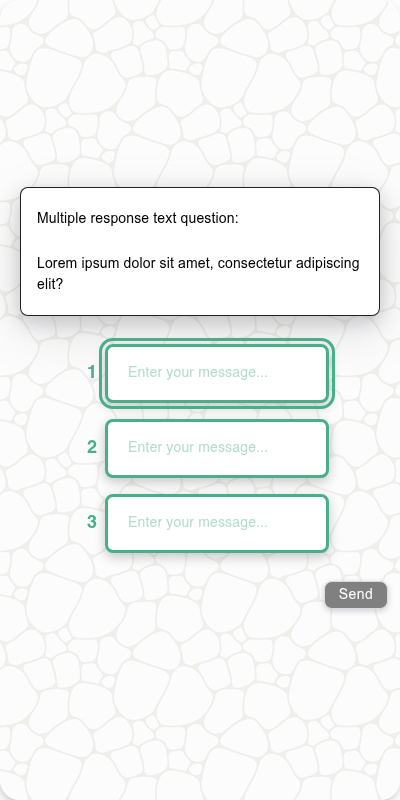
A Text Question is an open-ended question or open end, also called free text, text entry, a textbox, or a verbatim response question. A single-line field supports a short answer; a multiline field supports a long answer, essay, or comment box. The traditional experience can collect multiple responses through multiple textboxes when configured; the chat experience collects one response.
Chat Experience
- Single-line or multiline input, depending on the
shortflag. - Inline validation appears after submission.
- Retry prompt if response doesn't meet the quality threshold.
- Multiple responses (
number_of_responses/min_responses) are not available in the chat experience — they are supported only in the traditional experience.
| Plain text |
|---|
 |
Traditional Experience
- Supports multi-response collection if
number_of_responses> 1 (traditional experience only). - Respondents can enter several distinct answers before continuing.
- AI validation is unavailable with multiple responses: leave
quality_threshold,termination_threshold, andmax_attemptsat their defaults and omitvalidation_instructions. Acustom_validatormay still be used.
| Single response and an image | Multiple responses | Mobile optimized | Multiple responses, mobile optimized |
|---|---|---|---|
 |  |  |  |
Explicit Don't know response
Set dont_know_option="Don't know" for an explicit question-level opt-out. It preserves the configured label and bypasses AI quality scoring; it is not treated as an empty or weak answer. With multiple text inputs, it is exclusive of the other entered responses. Custom validators still receive the parsed response.
s.text_question("Which brand comes to mind first?", dont_know_option="Don't know")
Configuration Options
| Option | Type | Required | Default | Description |
|---|---|---|---|---|
dont_know_option | str | no | '' | Optional explicit opt-out label; per row for grids, otherwise for the whole question |
question | string | yes | - | The prompt shown to the user |
image | MediaItem | no | - | Optional image attachment |
image_size | tuple[int, int] | no | 600x600 | Bounding box size of the image; if omitted, images render at 600x600 |
default | str, list[str], or list[list[str]] | no | generated text | Simulated answer for test data. Use a string or a list of candidate strings for a single response; one full list response or a list of list-response candidates for multiple responses. Each simulated respondent picks one candidate at random |
short | boolean | no | False | Use a compact text field (for names, labels, etc) |
recodes | dict[str, str] | no | - | Optional text recodes (not often used here) |
validation_instructions | string | no | - | AI instructions for what makes a valid response, scored on a scale of 1 to 5 |
quality_threshold | int | no | 3 | Normal minimum passing score (1-5); lower-scoring responses trigger a clarification prompt |
termination_threshold | int | no | 1 | Minimum score accepted on the final attempt; a lower score terminates the survey. The default of 1 prevents score-based termination |
max_attempts | int | no | 3 | Maximum number of attempts before termination_threshold applies |
custom_validator | Callable[[str | list[str]], str | None] | no | - | Called with the parsed response (a string for one response, a list of strings for multiple); return an error message to reject it, otherwise None |
number_of_responses | int | no | 1 | Number of distinct answers to collect. Only supported in the traditional experience |
min_responses | int | no | - | Minimum number of answers required. Only supported in the traditional experience |
number_seconds | int | no | 0 | Seconds to wait before allowing the respondent to continue |
tags | s.tag() | no | - | Used to fill tokens in text and group questions in reports |
id | string | no | - | Optional stable identifier for this question |
Example Code
s.text_question("When you think about cars, which brands immediately come to mind?")
With validation and image:
s.text_question(
"What do you like about {brand} cars?",
tags=s.tag(brand="Ford"),
validation_instructions="Please provide a specific reason, not just 'they're good'",
image=s.get_image("Study images", file_name="ford-logo.png"),
)
With a custom validator:
known_brands = ["ford", "toyota", "honda", "tesla"]
s.text_question(
"Name a car brand you would never consider buying",
custom_validator=lambda x: "That doesn't sound like a brand name" if x.lower() not in known_brands else None,
)
Notes
- AI validation is optional but enabled by default.
- Termination is controlled by
termination_threshold. The default of 1 accepts every score the 1-5 validator can produce, so no respondent is terminated unless you raise it. custom_validatoroverrides AI validation entirely if provided.- A single response is returned as a
StringResponse; multiple responses are returned as aListResponse.