
When and Why to Use
Use this to identify the most and least preferred items from a set. It's ideal for:
- Prioritizing features, messages, or concepts
- Understanding tradeoffs in preferences
- Reducing scale bias compared to traditional rating questions
Supports full MaxDiff logic with dynamic sets, randomization, and chat and traditional display styles.
Use the MaxDiff Design Tool when you need reproducible custom sets with exposure, connectivity, and design-efficiency diagnostics before fielding.
Other Names and Formats
MaxDiff, also written Max Diff, stands for maximum difference scaling. This item-choice format is also known as best-worst scaling (BWS), best/worst scaling, or best-worst item scaling. Respondents choose the most and least preferred items in each set; these names describe the item-based task documented here.
Chat Experience
- The question is first shown as an introductory message, then respondents answer one choice question per label per set (e.g. "Least" then "Most")
- The item selected for the first label is disabled for the second
randomize=Truerandomizes item order within each setrandomize_labels=Trueindependently randomizes the order in which the two labels are asked- Without
randomize_labels, labels are asked in the order supplied
Traditional Experience
- Each set is shown once with both labels side by side (e.g. "Select Least and Most")
- Item and label-row randomization are controlled independently
- Ideal for desktop or larger screen interactions
| Chat experience | Traditional experience | Traditional experience on mobile |
|---|---|---|
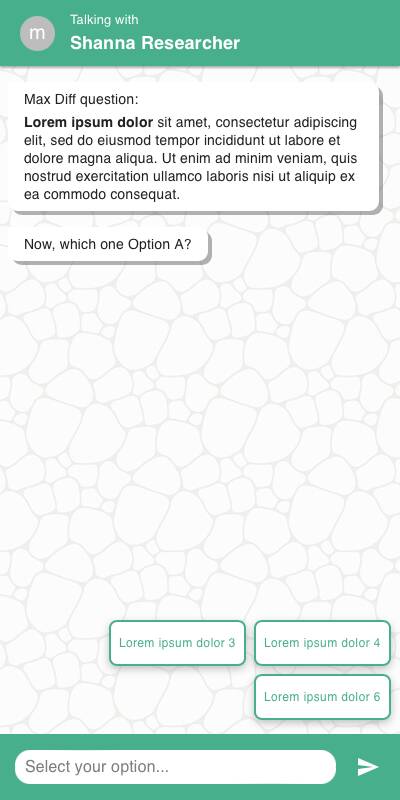 | 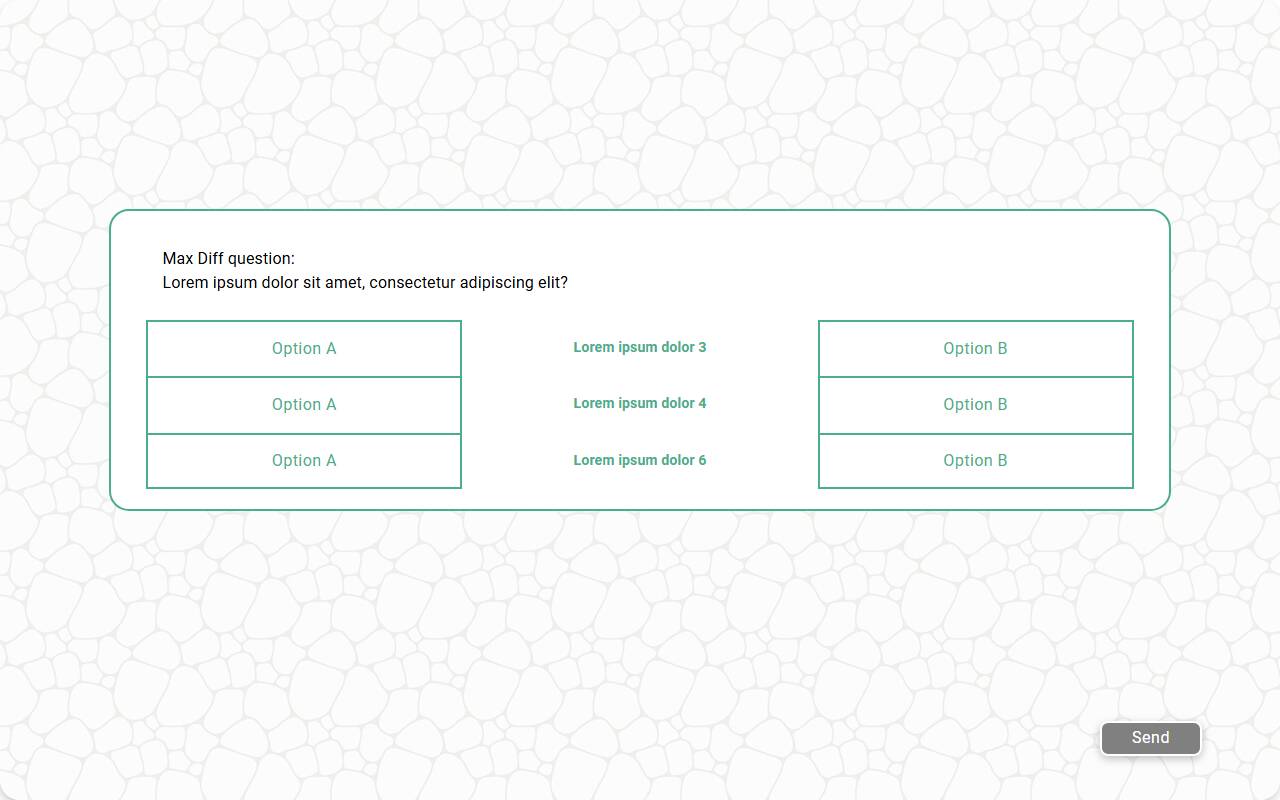 | 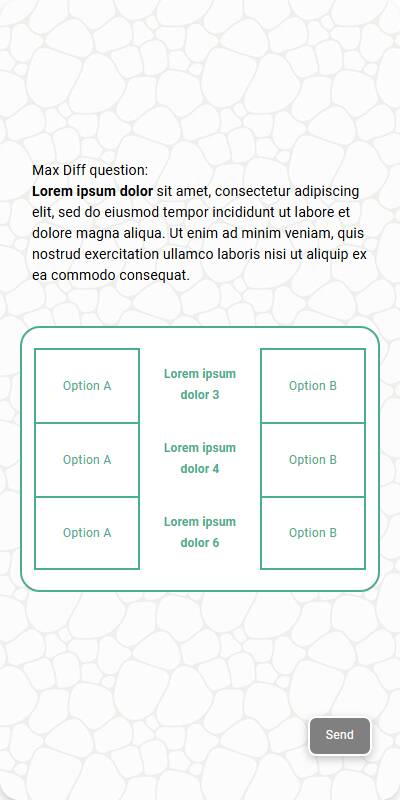 |
Configuration Options
| Option | Type | Required | Default | Description |
|---|---|---|---|---|
| question | string | yes | - | Prompt shown above the MaxDiff sets |
| items | List[str] or List[List[str]] | yes | - | Flat list (auto-generated sets) or custom list of sets |
| labels | List[str] | yes | - | Exactly two labels for the selection ends (e.g. ["Least", "Most"]) |
| image | MediaItem | no | - | Optional image shown above the sets |
| randomize | bool | no | False | Randomize item order within each set |
| randomize_labels | bool | no | False | Independently randomize the displayed order of the two labels |
| anchor_question | string | no | - | Ask an indirect all/some/none acceptability question after every task |
| anchor_labels | object | no | Standard all/some/none labels | Display labels keyed by all, some, and none |
| custom_validator | Callable[[dict[str, str] | str], str | None] | no | - | Called with the parsed set (traditional) or each parsed label choice (chat); return an error message to reject the response, otherwise None |
| dont_know_option | str | no | - | Optionally adds a fixed "Don't know" choice to each task |
| image_label_field | str | no | - | Label field to use for media items in the options |
| show_image_label | bool | no | True | Whether to show image labels for media options |
| image_size | Tuple[int, int] | no | 600x600 | Bounding box size for media options; if omitted, images render at 600x600 |
| number_seconds | int | no | 0 | Seconds to wait before allowing the respondent to continue |
tags | s.tag() | no | - | Used for substitution and grouping in reporting |
| id | str | None | no | None | Optional stable identifier for this question |
Example Code
Simple list with auto-generated sets:
car_brands = ["Ford", "Toyota", "Honda", "Tesla", "BMW", "Audi"]
s.max_diff_question(
"Which of the following car brands do you prefer?",
items=car_brands,
labels=["Least", "Most"]
)
With a fixed "Don't know" option in each task:
s.max_diff_question(
"Which of the following cars do you prefer?",
items=["Ford", "Toyota", "Honda", "Tesla"],
labels=["Least", "Most"],
randomize=True,
randomize_labels=True,
dont_know_option="Don't know"
)
Custom sets and tag substitution:
brand_cars = {
"Ford": [["Focus", "Fiesta", "Mustang"], ["Fusion", "Explorer", "Escape"]],
"Toyota": [["Corolla", "Camry", "Prius"], ["RAV4", "Highlander", "Tacoma"]],
}
for brand in ["Ford", "Toyota"]:
s.max_diff_question(
"Which of the following {brand} cars do you prefer?",
items=brand_cars[brand],
labels=["Least", "Most"],
tags=s.tag(brand=brand)
)
Notes
- If
itemsis a flat list, sets are generated automatically; pass a list of lists to use predefined sets - The MaxDiff Design Tool exports the predefined list-of-lists format directly
randomizeandrandomize_labelsuse independent randomization, so enabling one does not implicitly reorder the other- Indirect anchoring is configured with
anchor_questionand optionalanchor_labels; responses retain the semantic valuesall,some, andnone - Direct item anchoring uses
set_maxdiff_direct_anchorwith a complete item mapping toTrue,False, orNone; the MaxDiff Design Tool generates this follow-up flow when direct anchoring is selected - In the chat layout, the question is shown as an introductory message and the platform supplies the label-specific follow-up copy — no
{label}placeholder is needed in your question text - The returned
DictResponsecontains every task in generated order, keyed by its task ID. Each task has aselectionsresponse keyed by your most/least labels and, when answered, ananchorresponse containingall,some, ornone. custom_validatorchecks each parsed set in the traditional experience or each parsed label choice in chat; it does not receive all tasks together.
Anchored Reporting
The automatic Preference Analytics report starts with Utility Scores. Use Utility Scores and Simulated Share for relative preference without an anchor. These show priorities among the tested items, not absolute purchase probability. When direct or indirect anchor data is present, Utility relative to anchor and Probability above anchor add the acceptability reference. To configure a cross-tab, select the MaxDiff analytical question under Scope → Questions, then choose calculations in Analysis → Questions → Calculation. You can select several calculations for the same question and compare groups using Cut by.
Utility relative to anchor and Probability above anchor require direct or indirect acceptability data; they are distinct from the unanchored preference outputs. A MaxDiff acceptability anchor is not a conjoint purchase follow-up and does not by itself enable Purchase Lift Analytics. See Question aggregation types for calculation definitions.
Keep uncertain or missing direct answers as None rather than changing them to False. Supply a complete item mapping when calling set_maxdiff_direct_anchor so each item's acceptability is explicit. See Utility and simulated share methodology for interpretation.